Control your Mac from iPhone Duo with an app made only for that.
Open iPhone Duo flat and your Mac’s screen fills the 7.6‑inch inner display. Tap where you would click. FoldRemote is coming with iPhone Duo, which ships October 23.
Free year for the first 100. The first 100 people who sign up get a free year of FoldRemote.
First 100 signups, counted by email address, one per person. The free year starts when the app launches, and we’ll email you how to claim it.
Opened flat. Your Mac fills the inner screen.
A small menu‑bar helper streams the screen to the phone.
Pair once with the code the helper shows. After that, tap your Mac’s name.
FoldRemote is coming with iPhone Duo. The first 100 signups get a free year.
FoldRemote works with exactly two devices, iPhone Duo and a Mac. Keeping it that narrow let us build for one screen shape: the Duo opened flat, with your Mac filling it edge to edge. If you look after an office full of Windows PCs, you’ll want a different tool.
Toolbar and touch gestures
The toolbar sits along the top. Below it, on your Mac’s screen, a tap is a click.
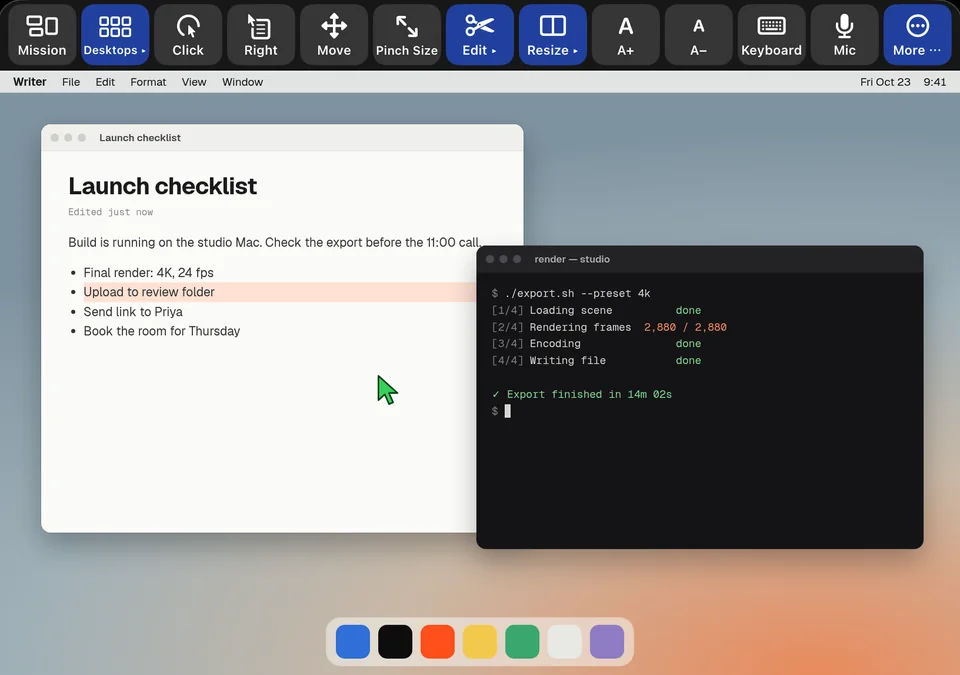
The toolbar is from a FoldRemote development build. The Mac desktop behind it is illustrated.
- 1DesktopsJump between desktops 1 to 6, or show the desktop.
- 2Click and RightClick or right‑click wherever the pointer is.
- 3EditSelect text, then copy, cut, paste or undo.
- 4ResizeSnap the front window to half the screen or fill it.
- 5KeyboardThe iOS keyboard, plus cmd, opt, ctrl, shift, esc, tab and arrow keys.
- 6MicDictate, and the words are typed on your Mac.
| Touch | On your Mac |
|---|---|
| Tap | Click |
| Double tap | Double‑click |
| Long press | Right‑click |
| Long press, then drag | Drag, with a magnifier under your finger |
| Two‑finger drag | Scroll |
| Pinch | Zoom the view |
Setup is two steps
Pair once at your desk. The phone remembers your Mac after that.
Install the menu‑bar helper. When macOS asks, allow Screen Recording and Accessibility.
Enter the 6‑digit code the helper shows. After that, open the app and tap your Mac.
Controlling your Mac from iPhone Duo: questions
Can I control my Mac from iPhone Duo?
Yes. Install the FoldRemote helper on your Mac and pair it with your iPhone Duo using the 6‑digit code it shows. Open the phone flat and your Mac’s screen fills the inner display. A tap there is a click.
What’s the free year for the first 100?
The first 100 people who sign up for the launch email get a free year of FoldRemote. It’s one per person, counted by email address. The free year starts when the app launches, and we’ll email you how to claim it.
What do I install on my Mac?
One small helper app that lives in the menu bar. It captures your Mac’s screen and streams it to the phone as video.
How does the phone reach my Mac?
Over the network. The helper on your Mac streams its screen to the phone as video, and your taps go back as clicks and keystrokes. At home, the phone finds the helper on your Wi‑Fi.
Does it work with iPhone Duo folded?
No. FoldRemote runs with the phone opened flat, where your Mac’s screen fills the 7.6‑inch inner display.
Is FoldRemote a general remote‑desktop tool?
No. FoldRemote works with one pair of devices, iPhone Duo and a Mac. If you need to reach a Windows PC or help someone else with their computer, a general remote‑desktop app is the better pick.
Be first to control your Mac from iPhone Duo
FoldRemote is coming with iPhone Duo on Oct 23. Sign up and we’ll email you when it’s on the App Store.
Free year for the first 100. The first 100 people who sign up get a free year of FoldRemote.
First 100 signups, counted by email address, one per person. The free year starts when the app launches, and we’ll email you how to claim it.